GOOGLE REVIEWS

Having a website for your business is no longer just an option; it’s a necessity. Your website serves as the online face of your company, operating around the clock as a dynamic, 24/7 sales representative and a direct channel of communication with your target audience.
Website builders are online platforms or software tools that enable individuals and businesses to create and design websites without the need for extensive coding or technical expertise. They provide a user-friendly interface that allows users to build and customise websites by using pre-designed templates, drag-and-drop editors, and a variety of features and functionalities.
The process of choosing the right platform can be a daunting dilemma. Your choice will determine the success and effectiveness of your online presence, which directly impacts your ability to attract potential customers, generate leads, and drive sales. Imagine your website as a digital storefront; it must be inviting, informative, and efficient. Just as you’d carefully select the location and design of your physical store, choosing the right website platform is an equally pivotal decision. It’s about creating a platform that not only showcases your products or services but also resonates with your target audience, engages them, and converts visitors into loyal customers.
I’ll focus on three of the UK’s most popular – WordPress, Squarespace, and Wix, each has its strengths and weaknesses, allowing you to make an informed choice that aligns with your business goals. By the end of this article, you’ll have a clear understanding of why, as digital marketing experts, we firmly believe that WordPress is the superior choice for building, maintaining, and managing a website that drives results for your business.
What is WordPress?
When it comes to website development, WordPress is nothing short of a digital powerhouse. It stands as one of the most versatile and popular website builders globally, powering an estimated 42.9% of all websites, and for excellent reasons.
Source: w3techs.com
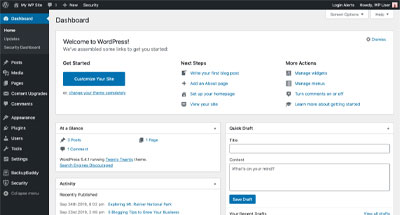

Whether you’re a budding entrepreneur, a small business owner, or a marketing manager of a larger enterprise, WordPress offers a compelling solution to create and manage your online presence effectively.
WordPress is renowned for its adaptability and flexibility. It caters to a vast spectrum of website needs, from simple blogs and portfolio sites to complex e-commerce platforms and corporate websites. Regardless of your industry or objectives, WordPress can be moulded to fit your unique requirements. This adaptability sets it apart from more rigid website builders like Squarespace and Wix.
The Open-Source Advantage:
One of WordPress’s standout features is its open-source nature, which means that the core software is not only free to use but also open for anyone to modify and extend. This fosters a vibrant community of developers, designers, and enthusiasts who continually contribute to the platform’s growth and innovation.
- Endless Customisation: With thousands of free and premium themes and plugins, you can customise your website’s design and functionality to suit your precise needs. Whether you require a sleek, professional look or a unique and creative aesthetic, there’s a theme for you.
- Scalability: As your business expands, so can your WordPress website. You’re not locked into a fixed template; instead, you can add new features, pages, and even switch to more robust hosting as your traffic grows.
- Independence and Control: Unlike website builders that tie you to their proprietary platforms, WordPress gives you ownership and control over your website. You can choose your hosting provider and backup solutions, ensuring you’re not bound by a single provider’s limitations or policies.

While WordPress’s capabilities are extensive, its user-friendly interface ensures that even those without extensive technical expertise can navigate and manage their websites with ease. Adding and editing content is as simple as using a word processor to make basic changes accessible.
Plugins like Yoast SEO provide powerful tools to optimise your website’s on-page SEO, improving its chances of ranking higher in search engine results and attracting organic traffic.
However, WordPress does have its limitations, especially for beginners. Here are some of the key limitations of WordPress:
- Learning Curve: While WordPress is user-friendly, it may still have a steeper learning curve when dealing with more advanced features and customisations.
- Maintenance Required: WordPress websites require regular updates for themes, plugins, and core software. Neglecting updates can lead to security vulnerabilities or compatibility issues.
- Complexity for Customisation: Extensive customisation in WordPress often involves knowledge of coding (HTML, CSS, PHP). Complex changes may require hiring a developer.
- Responsibility for Backups: While backups are crucial, WordPress doesn’t handle this by default. You’ll need to set up backup solutions or rely on your hosting provide.
It’s important to note that these limitations can be mitigated with the right knowledge, tools, and resources. WordPress remains the most popular choice for website building because it is more than just a website builder; it’s a dynamic, open-source ecosystem that empowers businesses and individuals to create, manage, and scale their online presence. Its versatility, user-friendliness, and robust community make it the top choice for those looking to make a significant impact in the digital realm.
What is Squarespace?
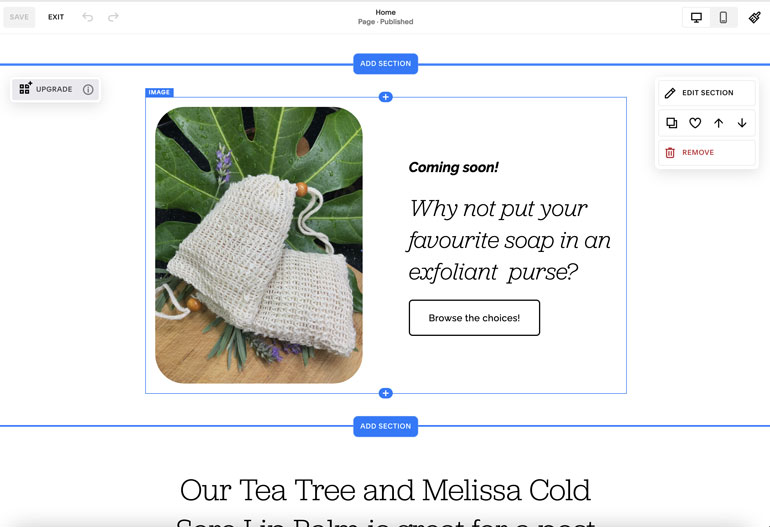
Squarespace streamlines website creation with its user-friendly design. It’s beginner-friendly, featuring pre-built templates with a polished look. You benefit from beautiful visuals, responsive templates, and a simplified design process. Squarespace integrates e-commerce, blogging, and analytics directly into templates, reducing plugin reliance. There’s also nothing to upgrade or update manually, which is all taken care of by the Squarespace eco-system. Yet, consider Squarespace’s limitations:
- Complex websites are expensive: Many of the above features such as e-commerce are paid add-ons, with both fixed monthly costs and per-transaction fees that can add up.
- Customisation Constraints: Templates limit extensive changes, requiring coding expertise for major modifications.
- Learning Curve: It’s user-friendly but may have a learning curve for beginners.
- SEO Challenges: Basic SEO tools may require more effort for top rankings.
- E-commerce Limitations: Complex stores may need platforms like Shopify or Woocommerce.
- Data Portability: Migrating can be tricky due to its proprietary nature.
Squarespace simplifies web design for visually appealing sites but has limitations in customisation, SEO, and e-commerce. Weigh these against its strengths for your website-building needs.
What is Wix?
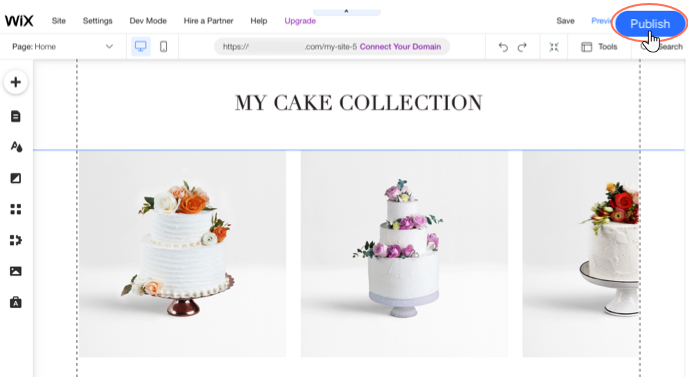
Wix is a more consumer-level product – akin to comparing professional Adobe software to PowerPoint for design. Wix makes aesthetics central, empowering users to turn creative visions into digital reality. It’s ideal for artists, photographers, and design enthusiasts. Wix’s standout feature is its drag-and-drop simple website building. No code or complexity — just select elements and drop them onto your canvas for easy site creation.
However, consider Wix’s caveats:
- Limited Customisation: While visually appealing, Wix’s templates can restrict layout flexibility for major changes.
- Scalability Challenges: As your site grows, Wix may lack the scalability and advanced features found in more robust platforms.
- SEO Complexity: SEO improvements notwithstanding, Wix may require more effort for top search engine rankings.
- Limited E-commerce Functionality: While it offers e-commerce, it may not match dedicated platforms like Woocommerce or Shopify for complex online stores.
Oh – and another big hurdle to consider for UK businesses considering Wix – .co.uk domains aren’t available!

Wix excels in visual design and user-friendly website building. It suits those who value aesthetics and creativity. Be mindful of its limitations in customisation, scalability, SEO, and e-commerce when making your choice.
Enjoying This Article?
Never miss another one...
Sign up for our e-mail newsletter and we'll let you know when we publish new pieces like this to help you on your marketing journey.
WordPress vs Squarespace: Strengths and Weaknesses
When it comes to the WordPress vs. Squarespace showdown, each platform boasts unique strengths and has its own set of limitations.
Flexibility and Customisability
WordPress shines in this category. Its open-source nature allows for unparalleled flexibility and customisability. With thousands of plugins and themes at your disposal, you can sculpt your website to match your exact vision. Squarespace, on the other hand, offers simplicity and elegant templates but may lack the depth of customisability that WordPress provides. Squarespace will include your website hosting (the server space required for your website’s files) as a part of your package, however, you cannot ever move your website away from their platform. WordPress websites can be hosted almost anywhere, and you are free to move it wherever and whenever you want.
SEO Advantage
When it comes to search engine optimisation (SEO), WordPress takes the lead and offers powerful tools like the Yoast SEO plugin. These tools empower users to optimise every aspect of their website, from meta titles and descriptions to on-page content and technical SEO elements. WordPress’s extensive range of SEO plugins and customisation options makes it an ideal choice for those who want to have a high level of control over their website’s SEO strategy.
In contrast, while Squarespace does provide SEO capabilities, it doesn’t match the depth and level of control that WordPress offers. Squarespace’s SEO features cover the basics, allowing users to edit meta titles, descriptions, and other key elements, but these can be limited by your chosen webpage templates.
The depth and precision of SEO can significantly impact your website’s visibility on search engines.
User-Friendliness and Learning Curve
Squarespace stands out for its design-centric approach. Its templates are not only visually appealing but also meticulously crafted. If easy-to-build aesthetics are your priority, Squarespace’s templates can give your site a polished and professional look. Squarespace is designed for simplicity, its template design system making it beginner-friendly with a gentle learning curve. If you’re new to website building, Squarespace can be a comfortable starting point. WordPress, while user-friendly, has a steeper learning curve, especially when dealing with more advanced features and customisation. That said plenty of drag-and-drop page builder themes and plugins are readily available if you want to make the design process easier.
Scalability Limitations
Here’s where Squarespace faces real limitations. For rapidly growing businesses that anticipate substantial increases in website traffic and content, WordPress’s scalability options provide the flexibility needed to adapt and expand the online presence seamlessly. While Squarespace excels at simplifying the initial website setup, it ultimately falls short when it comes to accommodating the sustained growth and evolving needs of ambitious enterprises. Therefore, for businesses with long-term scalability in mind, WordPress is often the preferred choice due to its extensive scalability options and flexibility.
In the WordPress vs. Squarespace battle, your choice hinges on your specific goals and preferences. WordPress excels in versatility and SEO, while Squarespace impresses with easy design and user-friendliness. Understanding these strengths and weaknesses will help you make the right decision for your website-building journey.
WordPress vs. Wix: Strengths and Weaknesses
In the WordPress vs. Wix face-off, both platforms bring unique strengths and have their share of limitations. Here’s a breakdown to help you decide which one aligns better with your needs:
WordPress’s Scalability and Open-Source Power
WordPress offers exceptional scalability and the advantage of an open-source nature. You can initiate your online journey with a basic blog and progressively expand it into a comprehensive e-commerce or corporate website, all within the same platform. The extensive open-source community consistently enhances WordPress’s features, granting users virtually limitless options and innovative solutions. Wix also offers scalability but within the confines of its ecosystem. While you can start with a basic site and add more features as your needs grow, you are typically limited to the tools and features provided within the Wix platform. This simplicity can be beneficial for users who want an easy, all-in-one solution.
Much like with the comparison with SquareSpace, you are locked into the Wix eco-system for hosting your website, whereas you are free to move your WordPress website to other hosting providers.
Wix’s Drag-and-Drop Simplicity
Wix excels in user-friendliness. Its built-in drag-and-drop editor, Wix makes website building a breeze, even for those with no technical background. You can create, edit, and rearrange elements effortlessly, making it perfect for beginners and its templates provide a solid foundation for building a visually stunning site. Be careful with this however, without a keen eye for layout and an understanding of web design fundamentals, you can very easily end up building a website that looks unprofessional, or is very hard for users to navigate. Once again, WordPress has a steeper learning curve than Wix – but to mitigate the learning curve, many drag-and-drop page builder themes and plugins are available that simplify the design process and make it more intuitive, even for those without extensive web design experience.
SEO Capabilities
WordPress excels in SEO capabilities, distinguishing itself when compared to Wix. WordPress’s extensive range of SEO plugins and options allows users to craft comprehensive and highly tailored SEO strategies, which can significantly enhance a website’s search engine ranking potential. These plugins empower you to fine-tune every aspect of your website’s SEO strategy, from meta titles and descriptions to on-page content and even technical SEO elements. While Wix has made strides in improving its “SEO Wiz” feature over time, it still doesn’t match the depth and level of control that WordPress offers in terms of search engine optimisation.
Wix’s Scalability and Flexibility Limitations
While Wix is celebrated for its simplicity and user-friendliness, these very qualities can become limitations as your website develops in scale and complexity. You will encounter limitations in terms of design flexibility, integrations, and customisation options, and more complex business websites with specific requirements will find it challenging to achieve their goals within the constraints of the Wix platform. In contrast, WordPress’s open-source nature and extensive plugin ecosystem allow for virtually limitless customisation and scalability. You can adapt their WordPress websites to meet the demands of rapid growth and evolving needs, making it the preferred choice for those with highly intricate or specialised website requirements.
In the WordPress vs. Wix showdown, your choice should align with your specific goals and preferences. WordPress excels in scalability, open-source flexibility, and SEO, while Wix impresses with its user-friendliness.
Squarespace vs. Wix: Strengths and Weaknesses
Here’s a detailed comparison for Squarespace vs. Wix to help you decide if one of these is the better fit for your website-building needs:
Template Libraries
One fundamental difference lies in the approach to design. Squarespace offers a structured design framework where column, row, and box locations are predetermined, which can be comforting for beginners and will ensure that your website looks more professional. In contrast, Wix provides more unstructured page building, allowing users to place design elements precisely where they want them. This flexibility can be appealing for those who seek unlimited creative freedom in their website design – but without a keen eye for design may lead to your website looking amateurish. So, the choice between structured or unstructured design largely depends on your personal preferences and the level of design control you desire.
SEO Features
SEO is vital for improving your website’s visibility in search engine rankings. Wix provides a built-in “SEO Wiz” feature, giving users full control over meta titles and descriptions, along with custom URLs. However, Google Analytics integration is available only with paid plans. On the other hand, Squarespace also allows control over meta titles, descriptions, and custom URLs, and it offers Google Analytics on all plans. Still, it’s worth noting that some older Squarespace templates may limit users’ ability to customize their page titles, which could be a drawback for those who prioritize SEO.
Ecommerce Capabilities
When it comes to e-commerce capabilities, both platforms enable users to sell physical and digital products and offer point-of-sale integration. Squarespace takes it a step further by permitting the sale of services. However, Wix allows users to sell offline and accept payment upon delivery, a feature not available in Squarespace. Pricing for e-commerce plans varies slightly, Wix being the more budget-friendly option for e-commerce enthusiasts, but both may charge a transaction fee per purchase depending on which package you opt for.
Limitations in Flexibility and Scalability
Squarespace offers visually appealing templates but can be less flexible for extensive customisations beyond the template’s structure. It may require coding skills for in-depth changes. Additionally, it may face limitations in handling rapidly growing businesses or larger, complex websites. Wix provides more flexibility with its drag-and-drop editor, allowing for greater customisation. However, it still has limitations compared to open-source platforms like WordPress, especially for highly complex or custom website needs. As your site grows and becomes more sophisticated, you may encounter scalability challenges.
Xposure’s Recommendation: WordPress
As digital marketing experts at Xposure, we wholeheartedly recommend WordPress as the go-to choice for your business website. Its unmatched versatility, SEO prowess, and scalability align perfectly with the needs of small business owners and marketing managers seeking to enhance efficiency and boost leads and sales.
As we’ve explored the options, it’s become evident that WordPress stands tall as the ultimate choice for crafting business websites that truly make an impact. Let’s recap why and encourage you to make the smart choice for your online presence.
Advantages of WordPress for Business Websites:
- Unparalleled Flexibility: WordPress’s open-source nature and vast plugin ecosystem provide limitless customisation possibilities. It adapts to your business’s unique needs, whether you’re running a blog, an e-commerce empire, or a corporate powerhouse.
- SEO Dominance: WordPress’s robust SEO tools and plugins like Yoast SEO give your website the edge in search engine rankings, ensuring that your target audience can find you effortlessly.
- Scalability: As your business grows, your website can grow with it. WordPress offers the scalability and versatility required to expand your online presence without limitations.
- Ownership and Control: With WordPress, you have ownership of your website, from choosing your hosting provider to managing your data. You’re not locked into a closed ecosystem.
- Supportive Community: WordPress boasts an active and vibrant user community, ensuring that help is always at hand when you need it. Countless experts are ready to assist you on your journey.
WordPress – the Smart Choice for Growth
Your website isn’t just a digital storefront; it’s the cornerstone of your online success. By choosing WordPress, you’re not merely creating a website; you’re laying the foundation for increased leads and sales. It’s a strategic investment that pays dividends by ensuring that your online presence resonates with your audience and drives real results.
WordPress Web Development with XposureWEB
We hope you’ve found this article useful, and that it explains why we love using WordPress to develop our client websites. Whilst WordPress is easy to use once your website is built, building a WordPress website from scratch does require a bit of knowledge and know-how. Let’s have a chat about our results-proven website development process for your company’s new website, and we’ll see if our approach is a good fit for your business…