GOOGLE REVIEWS

WordPress is one of the most popular platforms used for creating blogs and websites, powering over 30 million sites. It’s an outdated, but common misconception that WordPress is seen as an amateur’s toolkit because of its history as open-source software and its ease of use. However nothing could be further from the truth, with a great many business sites including Forbes, CNN, Mashable, and TechCrunch utilising the WordPress framework.
We’ve been building websites since 1998 and using WordPress to power our websites for over a decade. Whilst there are other options for your business site, it’s very rare that we come across a project that WordPress isn’t suited for.
Here are the business advantages of using the WordPress platform, and why we recommend it for developing professional websites…
Firstly, what is WordPress?
WordPress is an open source content manager that allows you to build sites on it. It was founded in 2003 by Matt Mullenweg and Mike Little, originally as a blogging platform.
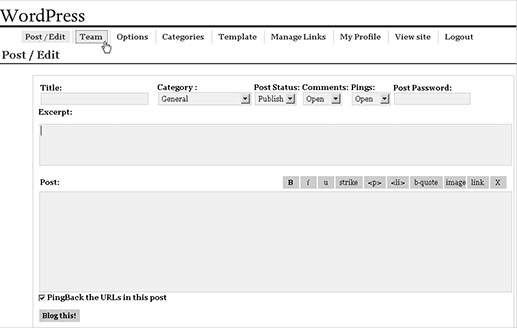
Today, it’s one of the world’s most popular website platforms, powering an estimated 42.9% of all websites according to W3Techs, and is the most widely used CMS (Content Management System) in the world with a 65% share of the CMS market.
Its biggest contender, Joomla, currently holds only 2.6% of the CMS market share. Joomla began as a framework for large websites, but has (fairly or not) a reputation for being outdated and slow. It also has a far smaller library of third-party plugins available. Drupal (market share of about 2%) has been around for several years longer than WordPress, and was originally designed to be used by organisations with lots of users. It’s not as easy to use as WordPress, requiring more coding skills, with a far steeper learning curve.
WordPress has remained the most popular Content Management System for websites because it is powerful, affordable, and flexible. It has a large community of developers who create thousands of free and premium plugins and add-ons. It has an integrated blog publishing system and supports most languages and is especially effective for SEO.
CMS vs Website Builders
If you’re looking for something that’s simple to install, maintain, update, and customise, WordPress is a good choice, since it’s open source, you can modify it to fit whatever needs you have. However if you’re building the website yourself there are alternatives…
Website builders like Squarespace are better for you if…
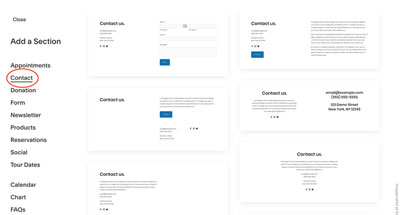
You’re not tech-savvy and you want to create a DIY website without needing to worry too much about custom domains, hosting service, security, and lots of other things that a website design agency or web development company would take care of for you. If you don’t mind using pre-existing design templates without too much customisation for your website pages, Squarespace is a good website builder to get your website off the ground quickly.
However the monthly extra costs can be a problem, and there’s not much in the way of expert support for Digital Marketing, and Search Engine Optimisation, or built-in blogging tools to further bring in business to your website.
WordPress is better for you if…
You need extra support for your growing your business site. It’s an excellent option if you’re looking to create a completely customised website from scratch.
Whilst coding experience isn’t required, if you want to really make your company website yours, you’ll probably fair better with some knowledge of HTML, CSS or PHP. However even if you are not an advanced user, with powerful tools and endless third-party plugins to choose from, there’s no limit to what you can create.
If you’re not put off by handling web hosting, security, or updates – or are prepared to have a web design agency handle the technical tasks for you, then WordPress is by far the best option.
Search Engines love WordPress websites
The source code behind WordPress is very clear and clean, making it easy for the search engines to understand and index the content on your site. Each page, post, and picture can have its own meta data, including keywords, descriptions, and titles. These SEO tools allow for very precise keyword targeting, meaning you can optimise your site for specific words and phrases.
 Third-party plugins such as the excellent Yoast SEO can further help your WordPress website search result performance. With a some input and planning from yourself, most of what the Yoast SEO plugin does is automatic. It will also appear in the backend of every page and post you create, analysing the your content and suggesting ways to improve it.
Your website can grow along side your business
WordPress sites are easily scalable, so you can grow your website without having to worry about performance issues. You can have hundreds or even thousands of webpages or blog posts on your website and the performance of your website won’t be affected with WordPress.
It’s easy to start with a small website with just the essentials e.g. Home, About, Contact, etc – and then expand your website and turn it into an online shop capable of taking thousands of pounds in orders.
WordPress is a very flexible solution suitable for many types of websites, in the past we have created:
- Brochure websites
- E-commerce websites and online shops
- Membership Sites
- Online Courses
- Company and Personal Blogs
- Sales Landing Pages
- Community Forums
Enjoying This Article?
Never miss another one...
Sign up for our e-mail newsletter and we'll let you know when we publish new pieces like this to help you on your marketing journey.
Easy to use and update
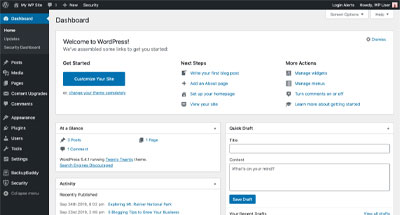
The back end interface, or admin panel, of WordPress is very user friendly – simple labels, navigation, and designs allow anyone to start using WordPress easily. After playing around in the backend for an hour or two, even a novice will soon find their way around.
Adding new pages, blog posts, images, etc. on a regular basis can be done quickly – because the technology is so straightforward, any time spent on formatting is greatly decreased.
It’s for this reason we use WordPress, so we can concentrate on the content and strategy for any new web page than having to worry about custom code and formatting (even for mobile devices) each time we add a webpage or blog post.
Multiple users
As an administrator of a WordPress website, you can set-up multiple users for the website. You can give each user different roles and permissions. This is useful if you want to manage several people working on one project and allow certain users to edit certain parts of the website. For instance, you might give a writer access to write blog posts, but not to change (or accidentally break!) anything on the website. This way, you don’t have to worry about giving contributors too much power over the entire website.
Powerful Blogging Tools
Having a blog on your website is a great way to help get more traffic from searches. Search engines reward websites that have regular updates and feature new content, and as you probably won’t be adding or changing your core services very often, a blog is the best answer.
WordPress was originally designed as a blog platform, so this is a built-in feature and easy to use. Adding RSS feeds, comments, and automatically updating blog posts to the rest of the website are also straightforward and easy to set up – helping to expand your audience and improve your online presence.
Additional Features – Themes and Plugins
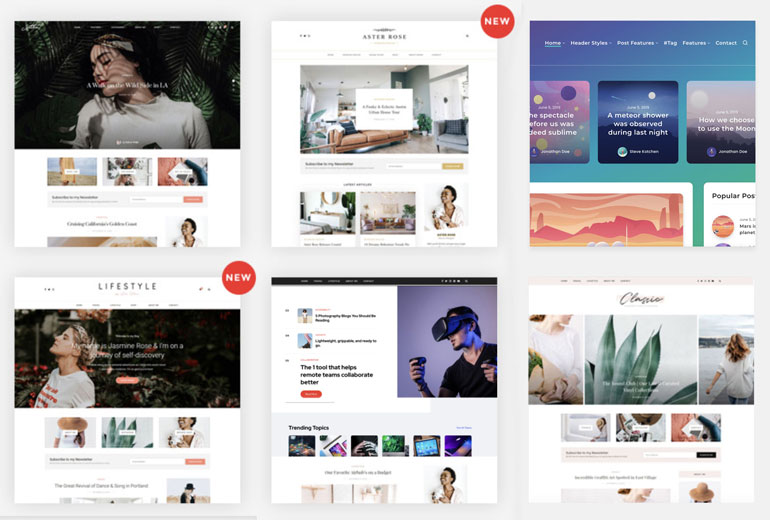
A ‘Theme’ is the package that controls the look, feel and front-end functionality of a WordPress website. When building your website, start by finding the theme that best suits your needs – there are plenty of both free and premium themes, services like ThemeForest and Elegant Themes are a good place to start with literally thousands available. Premium themes (paid for) especially will have lots of additional functionality and advanced features.
Want to add a video gallery, Twitter feed, event calendar, booking system, payment gateway or online shop to your website, but it wasn’t included in your chosen theme? No problem – it’s all possible with third-party plugins. Like themes, there is access to thousands of free and premium plugins available to add features to your website.
Try each theme and plug-in out for yourself and see which one works best for you. Read reviews from the online community, look at forums, and get answers from people who’ve used them before.
Be sure to only use plugins from a reputable source, or direct form the WordPress repository, to avoid accidentally adding a dangerous or malicious plugin to your website, and on that note…
Website security
When WordPress was first released, many criticised the open-source security features which resulted in a lot of bad press for the platform.
Since then, WordPress has improved security tenfold, and has been further developed with security in mind, focusing on making the online platform more robust and able to withstand an array of security issues as they arise.
However, you can still do a lot to make your website even more secure from hackers, malware, and other dangers. There are extra security plugins, backups and SSL certificates from your website hosting service that can be added. Remember to keep your core software, theme and additional plugins up to date (much like you would with your phone or computer with security updates) to avoid falling foul of any security vulnerabilities. We offer all these security updates on our WordPress Hosting as a part of our No-Hack Guarantee.
See our article on how and why WordPress websites get hacked for more details.
To Summarise
Using the WordPress CMS has many advantages and benefits. With its easy-to-use interface, intuitive user experience, and scalability, WordPress is the ideal all-in-one solution for virtually any web project.
WordPress Web Development with XposureWEB
We hope you’ve found this article useful, and that it explains why we love using WordPress to develop our client websites. Whilst WordPress is easy to use once your website is built, building a WordPress website from scratch does require a bit of knowledge and know-how. Let’s have a chat about our results-proven website development process for your company’s new website, and we’ll see if our approach is a good fit for your business…