GOOGLE REVIEWS

In the ever-evolving realm of social media, Meta (the parent company of Facebook, Instagram and Whatsapp) continues to push boundaries by introducing innovative platforms that cater to specific user needs. The latest offering is Threads, an exciting addition to the Instagram family.
Launched yesterday (6th July), Threads was downloaded an incredible 30 million times in 16 hours, making it one of the fastest-growing social media platforms ever. Threads is a Twitter alternative that provides a fresh avenue for businesses to connect with their audience in a more focused and engaging way. But unlike other challengers to Twitter such as Mastodon and Hive, Threads has the major advantage of importing your existing follows and followers from Instagram, meaning you won’t have to build your audience (again) completely from scratch. With its Instagram user base, it’s likely to become a big player with major social media influencers.
The situation is fast-moving, with Twitter already threatening legal action against Meta, but we’ll be keeping a close eye on Threads and how it will grow and develop. Let’s explore what Threads is and its potential, how to set up an account, and why you should seriously consider joining this new platform for your business.
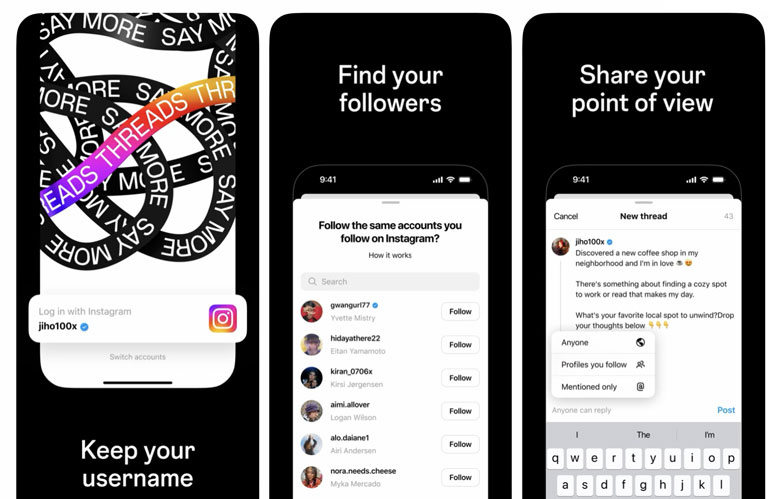
What Is Threads?
Threads is a social media platform developed by Instagram – directly connected to your Instagram account. Keep in mind your Threads account cannot be deleted without deleting your Instagram account too.
While it shares some similarities with its parent app, Threads takes a more targeted approach, allowing users to create private groups and engage in direct conversations. Designed primarily for close friends and smaller communities with a 500-character limit, Threads fosters more intimate interactions and enables users to share photos, videos (up to 5 minutes), messages, and status updates.
How Is It Different To Twitter?
Functionally it’s very similar – or will be – to Twitter. It’s a microblogging platform, and until the tumultuous acquisition of Twitter by Elon Musk last year, a move to challenge Twitter probably wouldn’t have been on the cards for Meta. With polished de-centralised technology, an existing user base from Instagram, and a reputation for better moderation, Threads shows promise. Meanwhile, Twitter suffers from technical troubles and Musk’s controversial move to limit free account usage in the last week.
However, Threads (currently) falls short compared to Twitter in several aspects, such as lacking direct messaging and trending topics, and a very limited search feature. Also for good or ill, there are no ads on the platform. Yet.
How To Set Up a Threads Account
It’s very simple, but currently only works on mobile at the moment, not on desktop. We assume that will be changing shortly too…
- Download the App: Start by downloading the Threads app, available for both iOS and Android devices, from their respective app stores.
- Log In or Create an Account: Use your existing Instagram credentials to log in to Threads. If you don’t have an Instagram account, you can create one within the Threads app.
- Customize Your Profile: Once logged in, you can personalize your Threads profile by adding a profile picture and a bio that represents your business.
- Privacy and Sharing Options: Threads offers various privacy settings that allow you to control who sees your content and messages. You can choose to share your updates with specific individuals or groups, ensuring the privacy and security of your interactions.
- Connect with Close Friends: Threads prompts you to create a “Close Friends” list by importing it from your Instagram account. This list will serve as the foundation for your connections on the platform.
Why Should Your Business Join Threads?
Opportunities to embrace your audience’s curiosity and seize the role of an early adopter on a big new platform don’t come around very often. As its user base rapidly grows, there’s a remarkable sense of excitement and engagement. People are signing up at an impressive pace, driven by the fear of missing out (FOMO) and the desire to be part of something fresh.
Targeted Engagement
Threads presents a unique opportunity for businesses to engage with their audience on a more personal level. By creating private groups or exclusive threads, you can share behind-the-scenes content, product teasers, or special offers with your loyal customers, fostering a sense of exclusivity and community.
Enhanced Brand Loyalty
The intimacy of Threads allows businesses to strengthen relationships with their most dedicated followers. By offering exclusive access to content, early product releases, or personalized interactions, you can cultivate a loyal customer base that feels valued and connected to your brand.
Real-Time Customer Support
Threads enables direct messaging, which can serve as a powerful tool for customer support. By creating dedicated support threads, businesses can address customer queries, provide assistance, and resolve issues promptly, ensuring customer satisfaction and building trust.
Efficient Collaboration
Threads simplifies communication and collaboration between team members. Businesses can create private threads to share project updates, discuss strategies, and coordinate tasks, resulting in streamlined operations and increased productivity.
Uncluttered Experience
With Threads, businesses can avoid the noise of the traditional Instagram feed. By focusing on smaller, more engaged communities, you can curate a clutter-free experience that highlights your content and encourages meaningful interactions.
Threads offers businesses a fresh perspective on social media engagement. By providing a more intimate and targeted experience, it allows for closer connections with customers, enhanced brand loyalty, and efficient communication. As Instagram continues to evolve and diversify its offerings, businesses should consider joining Threads to explore new avenues of engagement, build stronger relationships, and unlock the potential for growth in the digital landscape.